
As a full-stack developer, I get asked one question constantly: "Where should I host my website?" whether it's a portfolio, a client project, or a personal blog, you need something that is fast, reliable, and doesn't break the bank.
I've tested AWS, DigitalOcean, and generic shared hosting. But for 90% of users, my answer is simple: Hostinger.
Get an exclusive discount (up to 20% off) when you sign up using my link below.
Discount coupon: zayeefzahid
1. Speed & Performance (LiteSpeed)
Hostinger isn't just "cheap." It's fast. They use LiteSpeed Web Servers, which are significantly faster than the traditional Apache servers used by competitors like Bluehost or GoDaddy.
Why it matters:
- Dev Note
Google ranks fast websites higher. Hostinger's server response time is consistently under 100ms. Plus, if you use WordPress, their LSCache plugin makes your site fly.
2. The Features You Actually Need
Most hosting companies try to upsell you on basic features. Hostinger gives you the premium stuff for free in their standard plans.
| Feature | Hostinger | Others |
|---|---|---|
| SSL Certificate | ✅ Unlimited Free | ❌ Often Paid |
| Domain Name | ✅ Free (1st Year) | ❌ Paid |
| Backups | ✅ Weekly/Daily | ❌ Paid Add-on |
| Control Panel | ✅ hPanel (Modern UI) | ❌ Old cPanel |
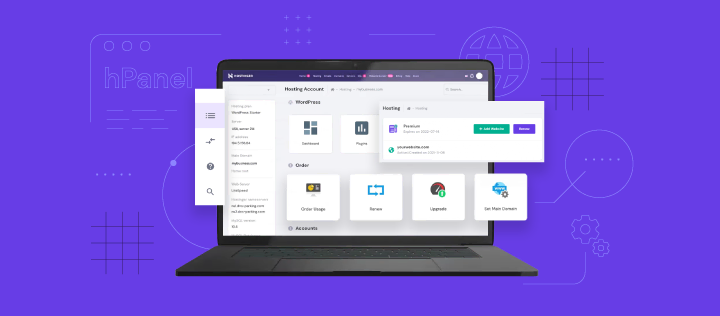
3. hPanel: A Modern UI
If you hate the look of the old-school cPanel (I know I do), you will love hPanel. It is custom-built by Hostinger. It's clean, intuitive, and makes managing your DNS, emails, and files incredibly easy.
4. How to Get Started (Step-by-Step)
-
Click the Link:
Go to Hostinger.com using my referral link to ensure you get the best price. -
Choose a Plan:
I recommend the "Premium" or "Business" web hosting plan. They offer the best value with free domains and unlimited bandwidth. -
Setup:
Create your account, claim your free domain, and use the "Auto-Installer" to deploy WordPress or upload your own code.
Conclusion
Whether you are a student deploying your first project, or a freelancer building a site for a client, Hostinger is the most logical choice in 2025. It's robust enough for developers but simple enough for beginners.
Don't overpay for slow hosting. Grab the deal below.
